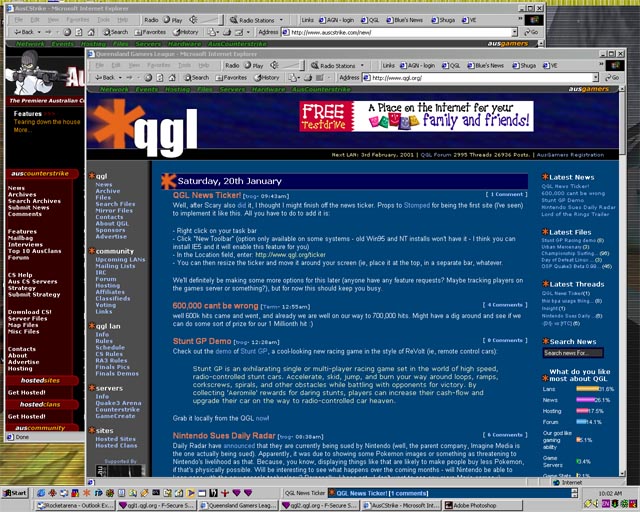
The news ticker is basically a locally placed window that scrolls up the latest news
headers from the QGL Network. Technically, its just a web page that works through the
toolbar system of your Windows-based computer.
After you've installed it, you will have a movable, resizable toolbar that scrolls (ticks)
through the items, looking something like:

Click on the image to see roughly how it will look on your desktop.
To check out what it looks like, you can
preview it as a normal web page.
Piece of cake! The only prerequisite is that you are using a version of Windows that supports
the toolbar system. In order to check this, simply right click on your task bar and see if it
says Toolbars. If it does, you're in business. Follow the steps:
- Right click on your task bar
- Move the mouse over Toolbars and click "New Toolbar"
- In the location field down the bottom of the dialog that pops up, simply type
in http://www.qgl.org/ticker (an easy way to
get it in there is to right click on that link, select "copy shortcut", and then paste
it into the input field.
- You're in business! The toolbar should appear and have the content in there. It should
start to scroll after 3 seconds or so. The toolbar will automatically refresh itself
after one hour, but you can manually refresh it by right clicking in the window and
clicking refresh
Go ahead, you can get code from the DHTML gurus over at
Dynamic Drive.
At the moment, we don't have a general-purpose interface to doing this - you're welcome to use our
code as a template, but we won't help you get it going until we have a easy-to-use interface to getting
it working.
We'll be working to make this a really useful tool for QGL viewers - as usual, any suggestions
on improvements are welcome - mail them through to us at
qgl@qgl.org.
|